10 Feb 2014
Most of our users are technical. They love writing code, and we love
providing API clients in the major programming languages to them (we are
currently supporting 10 platforms.
They are doers. They love prototyping. Just like us, they work for startups
which need to move fast, and get things done, keeping in mind that done is
better than perfect. It is very important that they don't want to waste
time. In this post, I will explain how one would have used our API up to
now, and how we introduced SQL and MongoDB connectors for easier onboarding,
integration and testing.
Before: The first steps with our API
Up until now, our onboarding process asked you to try the API by uploading
your data. We emphasized our documentation, and
we made sure our users would not need more than a few minutes to integrate our
REST API. Nevertheless, exporting your
application's data to a JSON or CSV file is often more complex than it
appears, especially when you have millions of rows - and especially because
developers are lazy :) No worries, that's totally
OK. It is something you may not be willing to do, especially
just to try a service, so we decided to try something else.
Initial import
90% of our users are using a SQL or MongoDB database. Exporting a table or a
collection to a JSON file can be easy if you're using a framework, for example
Ruby on Rails:
File.open("/tmp/export.json", "w") do |f|
  f << MyActiveRecordModel.all.to_json
end
...or more annoying, for example when using PHP without any framework:
mysql_connect('localhost', 'mysql_user', 'mysql_password');
mysql_set_charset('utf8');
$results = array();
$q = mysql_query("SELECT * FROM YourTable");
if ($q) {
  while (($row = mysql_fetch_assoc($q))) {
    array_push($results, $row);
  }
}
$fp = fopen('/tmp/export.json', 'w');
fwrite($fp, json_encode($results));
fclose($fp);
Anyway, in both cases it gets harder if you want to export millions of rows
without consuming hundreds GB of RAM. So you will need to use our API clients:
index = Algolia::Index.new "YourIndex"
MyActiveRecordModel.find_in_batches(1000) do |objects|
  index.add_objects(objects)
end
# that's actually what `MyActiveRecordModel.reindex!` does

mysql_connect('localhost', 'mysql_user', 'mysql_password');
mysql_set_charset('utf8');
$limit = 1000;
$start = 0;
$index = $client->initIndex('YourIndexName');
while (true) {
  $q = mysql_query("SELECT * FROM YourTable LIMIT " . $start . "," . $limit);
  $n = 0;
  if ($q) {
    $objects = array();
    while(($row = mysql_fetch_assoc($q))) {
      array_push($objects, $row);
      ++$n;
    }
    $index->addObjects($objects);
  }
  if ($n != $limit) {
    break;
  }
  $start += $n;
}
Incremental updates
Once imported, you will need to go further and keep your DB and our indexes
up-to-date. You can either:
- Clear your index and re-import all your records hourly/daily with the previous methods:
- non-intrusive,
- not real-time,
- not durable,
- need to import your data to a temporary index + replace the original one atomically once imported if you want to keep your service running while re-importing
Or
- Patch your application/website code to replicate every add/delete/update operations to our API:
- real-time,
- consistent & durable,
- a little intrusive to some people, even though it is only a few lines of code (see our documentation
After: Introducing connectors
Even if we did recommend you to modify your application code to replicate all
add/delete/update operations from your DB to our API, this should not be the
only option, especially to test Algolia. Users want to be convinced before
modifying anything in their production-ready application/website. This is why
we are really proud to release 2 open-source connectors: a non-intrusive and
efficient way to synchronize your current SQL or MongoDB database with our
servers.
SQL connector
Github project: algolia/jdbc-java-connector (MIT license, we love pull-requests :))
The connector starts by enumerating the table and push all matching rows to
our server. If you store the last modification date of a row in a field, you
can use it in order to send all detected updates every 10 seconds. Every 5
minutes, the connector synchronizes your database with the index by adding the
new rows and removing the deleted ones.
jdbc-connector.sh --source "jdbc:mysql://localhost/YourDB"
  --username mysqlUser --password mysqlPassword
  --selectQuery "SELECT * FROM YourTable" --primaryField id
  --updateQuery "SELECT * FROM YourTable WHERE updated_at > _$"
  --updatedAtField updated_at
  --applicationId YourApplicationId --apiKey YourApiKey --index YourIndexName
If you don't have an updated_at field, you can use:
jdbc-connector.sh --source "jdbc:mysql://localhost/YourDB"
  --username mysqlUser --password mysqlPassword
  --selectQuery "SELECT * FROM YourTable" --primaryField id
  --applicationId YourApplicationId --apiKey YourApiKey --index YourIndexName
The full list of features is available on Github (remember, we ♥ feature and pull-requests)!
MongoDB connector
Github
project: algolia/mongo-connector
This connector has been forked from 10gen-lab's official
connector and is based on
MongoDB's operation logs. This means you will need to start your mongod server specifying a
replica set.
Basically, you need to start your server with: mongod --replSet
REPLICASETIDENTIFIER. Once started, the connector will replicate each
addition/deletion/update to our server, sending a batch of operations every 10
seconds.
mongo-connector -m localhost:27017 -n myDb.myCollection
  -d ./doc_managers/algolia_doc_manager.py
  -t YourApplicationID:YourApiKey:YourIndex
The full features list is available on Github (we ♥ feature and pull-requests).
Conclusion: Easier Onboarding, Larger Audience!
Helping our users to onboard and try Algolia without writing a single line of
code is not only a way to attract more non-technical users; It is also a way
to save the time of our technical but overbooked users, allowing them to be
convinced without wasting their time before really implementing it.
Those connectors are open-source and we will continue to improve them based on
your feedback. Your feature requests are welcome!
29 Jan 2014
Today (Jan 29) at 9:30pm UTC, our service experienced an 8 minute partial
outage during which we have rejected many write operations sent to the
indexing API (exactly 2841 calls). We call it "partial" as all search queries
have been honored without any problem. For end-users, there was no visible
problem.
Transparency is in our DNA: this outage is visible on our status page
(status.algolia.com) but we also wanted to share
with you all the details of the outage and more importantly the details of our
response.
The alert
This morning I fixed a rare bug in indexing complex hierarchical objects. This
fix successfully passed all the tests after development. We have 6000+ unit
tests and asserts, and 200+ non regression tests. So I felt confident when I
entered the deploy password in our automatic deployment script.
A few seconds after, I started to receive a lot of text messages on my
cellphone.
We developed several embedded probes to detect all kinds of problems and alert
us using Twilio and Hipchat APIs. They detect for example:
- a process that restart
- an unusually long query
- a write failure
- a low memory warning
- a low disk-free warning
- etc.
In case embedded probes can't run, other external probes run once a minute
from an independent datacenter (Google App Engine). These also automatically
update our status page when a problem impacts the quality of service.
Our indexing processes were crash looping. I immediately decided to rollback
to the previous version.
The rollback
Until today, our standard rollback process was to revert the commit, launch
the recompile and finally deploy. This is long, very long when your know that
you have an outage in production. The rollback took about 5 minutes in total
out of the 8 minutes.
How we will avoid this situation in the future
Even if the outage was on a relatively small period of time, we still believe
it was too long. To make sure this will not happen again:
- We have added a very fast rollback process in the way of a simple press button like the one we use to deploy. An automatic deploy is nice, but an automatic rollback is actually more critical when needed!
- Starting now, we will deploy new versions of the service on clusters hosting community projects such as Hacker News Search or Twitter handle search, before pushing the update on clusters hosting paying customers. Having real traffic is key to detect some types of errors. Unit-tests & non-regression tests cannot catch everything.
- And of course we added non-regression tests for this specific error.
Conclusion
Having all these probes in our infrastructure was key to detect today's
problem and react quickly. In real conditions, it proved not to be enough. In
a few hours we have implemented a much better way to handle this kind of
situation. The quality of our service is our top priority. Thank you for your
support!
24 Jan 2014
We are Hacker News readers and probably just
like you, there is not a day that goes by we don't use it. It is a little like
checking the weather app of the tech world. Long story short, Hacker News is
awesome, and we wanted to add our two cents to make it even greater to use.
Indeed, here is our problem: how do we instantly access the old posts we wish
we had saved?
Powering a new Hacker News search engine
Up until now we've been using hnsearch.com,
maintained for years by the great folks at Octopart. I
hope we speak on behalf of the HN community here, we are all grateful for the
work they put in hnsearch.com and they inspired us to pursue their effort.
Back in September 2013, we created a "homemade Hacker News
crawler" and built a search
engine with the data we could get. It was not perfect but somehow, it did the
job fine.
Now part of the Ycombinator W14 batch, we have a direct access to the data
and it has allowed us to provide instant search for the entire content of
Hacker News, 1.2 million articles, 5.2 million comments as of today. See for
yourself right here: hn.algolia.com
Here is how we did it
Hacker News API access
- YC provides us a private API access to fetch batches of 1000 items (an item being a comment or a post). Every two minutes, we update our database with the latest 1000 items. Last 48,000 items are refreshed every hour to keep the number of votes and comments up to date.
# Yep, that's a Lisp API :)
EXPORT_REGEXP = %r{^((d+) (story|comment|poll|pollopt) "(.+)" (d+) (?:nil|"(.*)") (?:nil|"(.+)") (?:nil|"(.*)") (?:nil|-?(d+)) (?:nil|(([d ]+))) (?:nil|(d+)))$}
Thumbnails generation
- We use wkhtmltoimage to render the URLs and generate the associated thumbnails. Playing with connection timeouts and JavaScript infinite loops was a pleasure:
(timeout 60 xvfb-run --auto-servernum --server-args="-screen 0, 1024x768x24"
wkhtmltoimage-amd64 --height 768 --use-xserver--javascript-delay 30000 "$URL" "$FILE" ||
timeout 60 xvfb-run --auto-servernum --server-args="-screen 0, 1024x768x24"
wkhtmltoimage-amd64 --height 768 --use-xserver --disable-javascript "$URL" "$FILE") &&
convert "$FILE" -resize '100!x100' "$FILE"
Thumbnails storage
- Thumbnails are resized and stored on a S3 bucket.
AWS::S3::S3Object.store("#{id}.png", open(temp_file), 'hnsearch', access: :public_read)
Thumbnails distribution
- We configured a CloudFront instance targeting the S3 bucket to distribute thumbnails with low latency and high data transfer speed. We followed Amazon's associated developer guide.
Indexing
- We used the "algoliasearch-rails" gem and a standard (Ruby on Rails) MySQL-backed ActiveRecord setup. Indexing is performed automatically as soon as new items are added to the database, providing a near-realtime experience.
Configuration
class Item < ActiveRecord::Base
  include AlgoliaSearch

  algoliasearch per_environment: true do
    # the list of attributes sent to Algolia's API
    attribute :created_at, :title, :url, :author, :points, :story_text, :comment_text, :author, :num_comments, :story_id, :story_title, :story_url
    attribute :created_at_i do
      created_at.to_i
    end

    # The order of the attributes sets their respective importance.
    # `title` is more important than `{story,comment}_text`, `{story,comment}_text` more than `url`, `url` more than `author`
    # btw, do not take into account position to avoid first word match boost
    attributesToIndex ['unordered(title)', 'unordered(story_text)', 'unordered(comment_text)', 'unordered(url)', 'author', 'created_at_i']

    # add tags used for filtering
    tags do
      [item_type, "author_#{author}", "story_#{story_id}"]
    end

    # Custom ranking allows to automatically sort the results by a custom criteria
    # in this case, a decreasing sort of the number of HN points and comments.
    customRanking ['desc(points)', 'desc(num_comments)']

    # controls the way results are sorted sorting on the following 4 criteria (one after another)
    # I removed the 'exact' match critera (improve 1-words query relevance, doesn't fit HNSearch needs)
    ranking ['typo', 'proximity', 'attribute', 'custom']

    # google+, $1.5M raises, C#: we love you
    separatorsToIndex '+#$'
  end

  def story_text
    item_type_cd != Item.comment ? text : nil
  end

  def story_title
    comment? && story ? story.title : nil
  end

  def story_url
    comment? && story ? story.url : nil
  end

  def comment_text
    comment? ? text : nil
  end

  def comment?
    item_type_cd == Item.comment
  end

  def num_comments
    item_type_cd == Item.story ? story_comments.count : nil
  end
end
Search
- Queries are sent directly to our API via the javascript client, the javascript code uses a public API-Key that can only perform queries.
Seeking feedback from the community
There is still room for improvement and we would love to know how you are
searching for news on HN. What is important for you? Are you searching by
date, by upvote, by comment or by user? All together maybe?
We would love to have your feedback! Don't hesitate to checkout the code: We
open-sourced it.
Special thanks to the Octopart and
YC teams for making this experience possible!
Give it a try now: hn.algolia.com
18 Jan 2014

Search is important
An effective search engine should be a seamless and natural extension of the
user experience. With improved relevance, your users should be able to find
what they are looking for in no time.
Unfortunately, developers often consider search as a second-tier priority.
This is a mistake. Every day, consumers use Google, Amazon, and Youtube to
find what they want on the web quickly and easily. Users of web applications
and eCommerce websites will feel the gap in search experience. As their
expectations are not met, your conversion rate will plummet, your bounce rate
will skyrocket, and the damage to your brand may be irredeemable.
Search is tricky
The reason why many web applications and e-commerce websites suffer from bad
search is because finding a good solution is not easy. Few current search
technologies combine relevancy and business metrics in a way that sorts search
results optimally.
In most cases, they fail on the following items:
- long response times,
- no handling of mistakes,
- no search field auto-completion,
- unexplainable or even nonexistent results.
To improve your search experience, you first need to understand which areas
are problematic. That's exactly why we built Search Grader by Algolia.
Introducing Search Grader by Algolia
Search Grader by Algolia is a tool to help you
quickly find out what your search engine may be missing. We divided the search
user experience in 3 categories in order to get a maximum score of 100:
- User Experience: 30 points
- Speed: 20 points
- Relevance: 50 points
User Experience: 30/100
User experience is not just design, it's the key of a good user satisfaction.
If your users cannot find what they're searching for, they will just leave.
- Searchbox visibility (3 pts): It is easier for your users to find something if your search bar is clearly visible!
- Descriptive placeholder (2 pts) : A hint in your search bar is a good way to let your users know what kind of data they can dig into.
- Searchbox auto-completion (6 pts): Auto-completion guides your users more efficiently towards what they are looking for.
- Suggestions after the first keystroke (5 pts): Delight your users by providing relevant suggestions immediately after the first keystroke.
- Faceting (4 pts): Faceting enables users to browse results by filtering them on specific categories (e.g., author, tags, price).
- Highlight (6 pts): You need to explain why the displayed results are chosen, especially when you tolerate typos or misspelled queries.
- Pagination (2 pts): Providing relevant results on the first page is great. But to keep your users engaged, you need to give them an easy way to access other results.
- Picture (2 pts): Sometime images are the fastest way to display information. Users will go through results and find the right hits much faster if you show them images.
Speed: 20/100
If results show up in more than 200ms, you will lose part of your users. Time
is money, real-time is gold. Because your location is important to the speed
of the search we graded speed 3 times based on the location of the user:
- Response time from US East coast
- Response time from US West coast
- Response time from Europe
Relevance: 50/100
Relevance is when you give your users what they want in the top results.
Although it's not very fancy, it's probably the more critical aspect of a good
search engine.
- Typo-tolerance (10 pts): People make a lot of typos, especially on mobile devices. Tolerating misspelled queries provides a great value to both your users and the products you promote.
- Auto-completion shows results, not queries (10 pts): Suggesting queries is good. Suggesting results directly is a lot better as you spare your users one click and a lot of time.
- Ranking uses business metrics (10 pts): Considering customized criteria such as sales numbers or the popularities in the way you rank results makes a key difference. It is THE way to give relevant results with one single keystroke.
- Overall ranking (20 pts): Search must always return relevant results. We perform multiple queries to detect if your search is performing well.
Get Google, Amazon-like search for your website
These criteria were defined by our team of experts with over 30+ years of
experience in search.
We tested out some of the biggest names in tech:
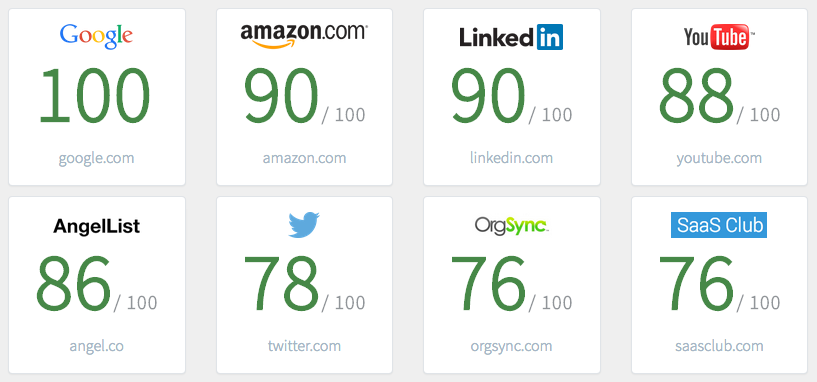
As you could expect, Amazon and LinkedIn received an excellent score of
90/100. That's the kind of quality Algolia can help you achieve in your
application or e-commerce website, for as low as
$19/month.
Now, how about your search? How is it performing? To find out, use Search
Grader by Algolia.
If you want to share your ideas with us, please leave your comments!
06 Jan 2014
Hello Twitter,
I have been using your service for awhile, and I love it!
At first, I was skeptical about what you could offer: Broadcasting to all my
friends that I was eating a pizza, or taking a walk, is not really my cup of
tea. But 3 years ago I figured out what Twitter was really meant for and how
it could help me in a totally different way from what I first thought:
- sharing interesting articles,
- checking if /replace by the service provider you want/ is down,
- or catching up on HackerNews.
More recently, I discovered you had a feature that could help me even more: I
can now ask for support by tweeting. Tweeting is often faster and more
productive than sending an email. You taught me to include the recipient's
Handle in my tweets, and your current Handle auto-completion implementation
works pretty well: but what if you could provide a better typo-tolerance and
ranking? (I'm NOT speaking about your official OSX/iOS native clients and
its totally unusable auto-completion feature... btw, could you explain me why it
is different from the one on your website?).
I have been leading a search-engine development team over the last 5 years and
I'm now VP of engineering at Algolia. I am aware that considering my job, I
have kind of an "expert" point of view about search. But search has become so
essential that I am convinced it must be irreproachable. Did you know
that 1.7M+ people are currently following
expecting great things from your search-engine, Twitter :) Here is how I would
improve search for Twitter handles:
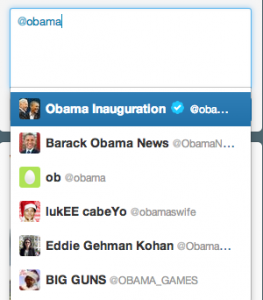
For example, it would be nice if I could find President
@barackobama with his last name:
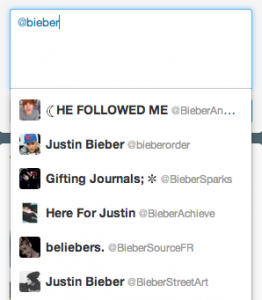
Same for Justin:
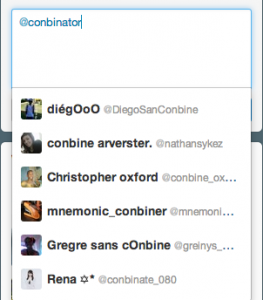
Typo-tolerance is now a must-have, especially because we're all using
smartphones and tablets:
More and more handles are now prefixed/suffixed by "official", which makes
finding @OfficialAdele just impossible:
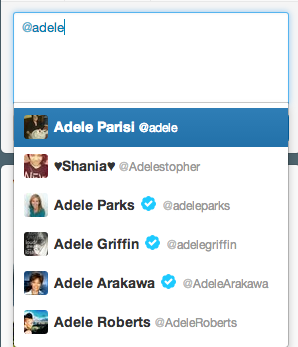
For sure we can improve it, let's code!
First of all Twitter, I need your Handles database :)
- I used your Streaming API to crawl about 20M+ accounts in ~2 weeks: it's not blazing fast but I must admit it does the job (and it's free). That's about 5 lines of Ruby with TweetStream, good job guys!
- and Daemonize to create a bin/crawler executable.
#! /usr/bin/env ruby

require File.expand_path(File.join(File.dirname(__FILE__), '..', 'config', 'environment'))

daemon = TweetStream::Daemon.new('crawler', :log_output => true)
daemon.on_inited do
  ActiveRecord::Base.connection.reconnect!
  ActiveRecord::Base.logger = Logger.new(File.join(Rails.root, 'log/stream.log'), 'w+')
end
daemon.on_error do |message|
  puts "Error: #{message}"
end
daemon.sample do |status|
  Handle.create_from_status(status)
end
For each new tweet you send to me, I store the author (name + screenname +
description + followerscount) and all his/her user mentions.
class Handle < ActiveRecord::Base

  def self.create_from_user(user)
    h = Handle.find_or_initialize_by(screen_name: user.screen_name)
    puts h.screen_name if h.new_record?
    h.name = user.name
    h.description = (user.description || "")[0..255]
    h.followers_count = user.followers_count
    h.updated_at ||= DateTime.now
    h.save
    h
  end

  def self.create_from_status(status)
    Handle.create_from_user(status.user)
    status.user_mentions.each do |mention|
      m = Handle.find_or_initialize_by(screen_name: mention.screen_name)
      m.updated_at ||= DateTime.now
      m.name = mention.name
      m.mentions_count ||= 0
      m.mentions_count += 1
      m.save
    end
  end

end
And every minute, I re-index the last-updated accounts with a batch request
using algoliasearch-rails,
every 1.minute, roles: [:cron] do
  runner "Handle.where('updated_at >= ?', 1.minute.ago).reindex!"
end
The result order is based on several criteria:
- the number of typos,
- the matching attributes: the name/handle is more important than the description,
- the proximity between matched words,
- and the followers count (I also use the "mentions count" if my crawler didn't get the followers count yet).
I could have improved the results by using the user's list of
followers/following but I was limited by your Rate
Limits. Instead, I chose to
emphasize your top-users (accounts having 10M+ followers).
Here is the configuration I used
class Handle < ActiveRecord::Base

  include AlgoliaSearch
  algoliasearch per_environment: true, auto_index: false, auto_remove: false do
    # add an extra score attribute
    add_attribute :score

    # add an extra full_name attribute: screen_name + name
    add_attribute :full_name

    # do not take `full_name`'s words order into account, `full_name` is more important than `description`
    attributesToIndex ['unordered(full_name)', :description]

    # list of attributes to highlight
    attributesToHighlight [:screen_name, :name, :description]

    # use followers_count OR mentions_count to sort results (last sort criteria)
    customRanking ['desc(score)']

    # @I_love_you
    separatorsToIndex '_'

    # tag top-users
    tags do
      followers_count > 10000000 ? ['top'] : []
    end
  end

  def full_name
    # consider screen_name and name equal
    # the name should not match exact so we concatenate it with the screen_name
    [screen_name, "#{screen_name} #{name}"]
  end

  # the custom score
  def score
    return followers_count if followers_count > 0
    if mentions_count < 10
      mentions_count
    elsif mentions_count < 100
      mentions_count * 10
    elsif mentions_count < 1000
      mentions_count * 100
    else
      mentions_count * 1000
    end
  end

end
The user query is composed by 2 backend queries:
- the first one retrieves all matching top-users (could be replaced by a query targeting your followers/following only)
- the second one the others.
Try it for yourself, and enjoy
relevant and highlighted results after the first keystroke: Twitter Handles
Search.


